Need to set up lots of options in Google Forms or keep choice lists synced whenever your spreadsheet updates? Synchronize dropdowns, multiple choices, and checkboxes directly from your sheet columns with our free Google Apps Script template!
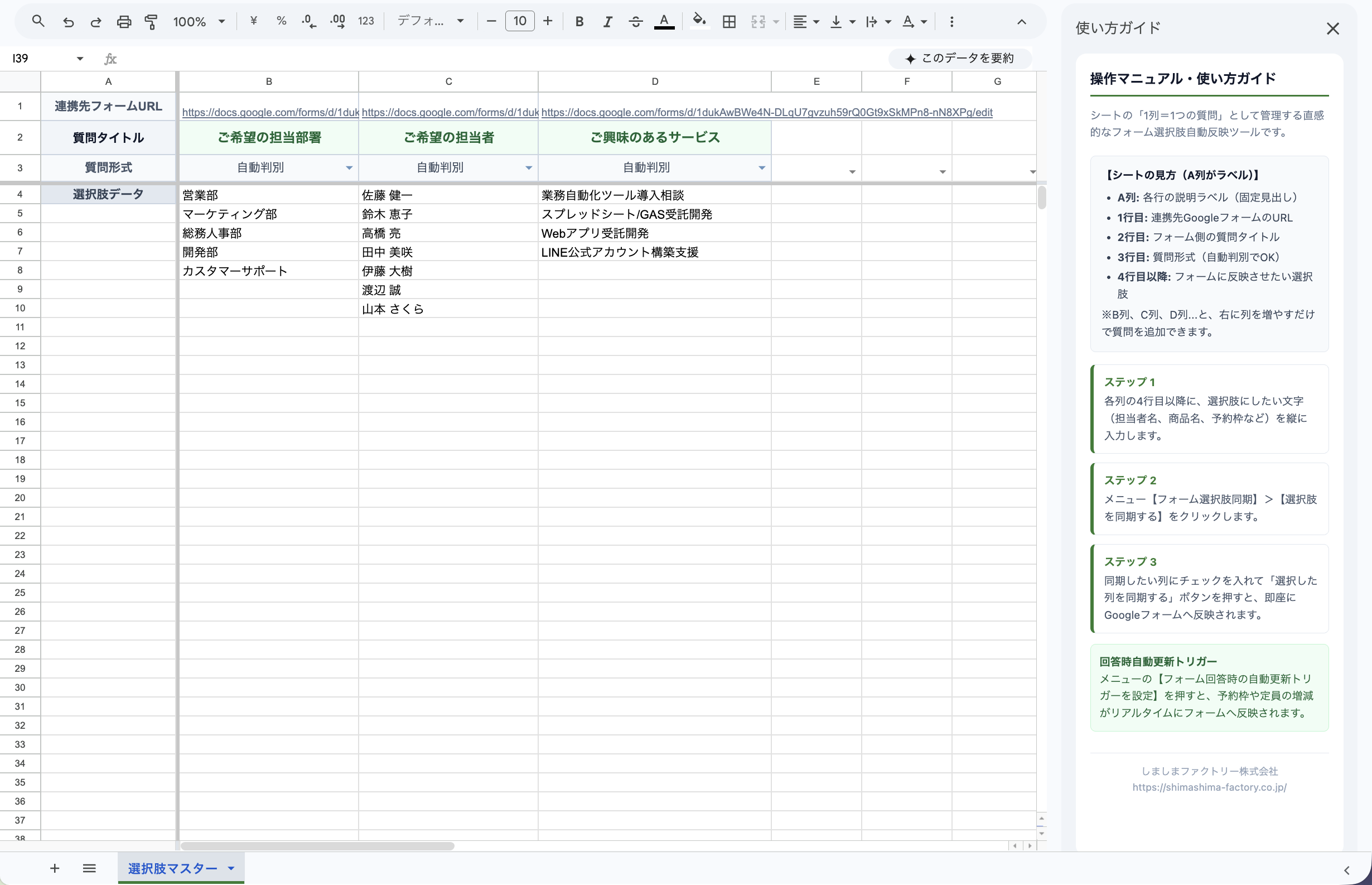
▲ Column-based intuitive choice management interface
Common Challenges in Managing Google Form Choices
Google Forms is ideal for inquiries, registrations, and surveys. However, managing dynamic or long choice lists manually presents everyday hurdles:
- Tedious Initial Setup: Manually typing dozens of branch names, employee names, or product options into form fields is repetitive and time-consuming.
- Keeping Lists Synchronized: When your master data in Google Sheets changes, forgetting to update Google Forms leaves outdated options visible to respondents.
- Automating Capacity Management: Automatically closing or removing time slots as seats fill up requires real-time synchronization between responses and form choices.
To address both bulk setup and continuous synchronization, Shimashima Factory built the Google Sheets to Form Sync Tool (sheets-to-form-sync).
Real-World Metaphor: Supermarket Display Shelves
Think of your spreadsheet as a series of display shelves in a supermarket:
- Column A (Fixed Signpost): Indicates the role of each row. Row 1: Target Form URL, Row 2: Question Title, Row 3: Format, Row 4+: Choice Items.
- Columns B, C, D… (Shelves): Each vertical column represents one question. The top rows contain the signpost, and the rows below list the items displayed in your form.
Simply arrange your items in a column and click sync. Everything updates seamlessly.
Key Features
1. Selective Column Sync via Checkbox Dialog
Select only the questions you want to update using our built-in modal dialog. Perfect when you only need to refresh a specific column without touching others.
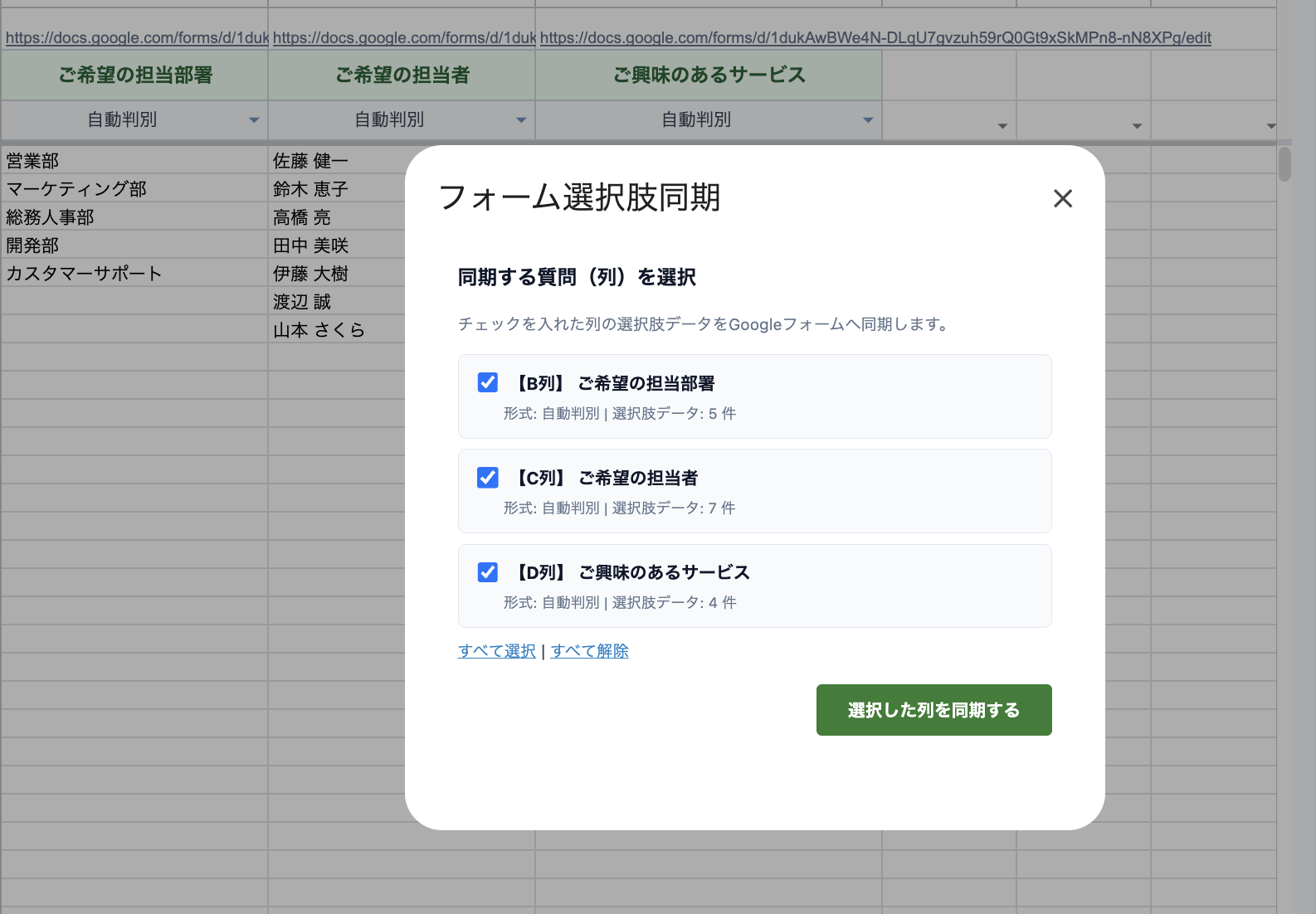
▲ Clean modal dialog with checkbox selection and inline feedback
2. Zero Browser Alerts
No obtrusive system alert popups. All confirmations appear as clean inline messages or elegant toast notifications.
3. Automatic Trigger on Form Submission
Enable the form submission trigger with one click. Whenever a user submits a response, the spreadsheet automatically updates remaining slots in real time.
4. Automatic Demo Form Creation in Same Folder
Generate a ready-to-test Google Form inside the very same Drive folder as your spreadsheet with a single click.
5. Always-On Sidebar User Guide
The instruction manual opens automatically in the right sidebar upon spreadsheet launch, keeping guidance within reach without opening external documents.
Get Started in 3 Easy Steps
- Make a Copy: Open the spreadsheet template and click “File” > “Make a copy” to save it to your Google Drive.
- Generate Initial Template: Click “Form Choice Sync” > “Generate Initial Template” in the top menu to auto-create your demo form and configure columns.
- Enter Choices & Sync: Add your choice items from row 4 onwards and click “Sync Choices” to update your Google Form in seconds.
Get the Free Google Sheets to Form Sync Template
Add Shimashima Factory on Official LINE to instantly receive your free copy link of the master spreadsheet with pre-configured GAS scripts and templates!
Available anytime from the rich menu under “Free Tools”.
Need Help with Setup?
Initial setup takes just one click after copying the template. Check our step-by-step documentation for full details.
Need a Custom Tool for Your Business?
We develop and customize practical Google Sheets, GAS automation, and AI workflows tailored to your workflow.